```python
import torch
from PIL import Image
from transformers import AutoModel, AutoTokenizer
torch.manual_seed(100)
model = AutoModel.from_pretrained('openbmb/MiniCPM-V-4_5', trust_remote_code=True, # or openbmb/MiniCPM-o-2_6
attn_implementation='sdpa', torch_dtype=torch.bfloat16) # sdpa or flash_attention_2, no eager
model = model.eval().cuda()
tokenizer = AutoTokenizer.from_pretrained('openbmb/MiniCPM-V-4_5', trust_remote_code=True) # or openbmb/MiniCPM-o-2_6
image = Image.open('./assets/minicpmo2_6/show_demo.jpg').convert('RGB')
enable_thinking=False # If `enable_thinking=True`, the long-thinking mode is enabled.
# First round chat
question = "What is the landform in the picture?"
msgs = [{'role': 'user', 'content': [image, question]}]
answer = model.chat(
msgs=msgs,
tokenizer=tokenizer,
enable_thinking=enable_thinking
)
print(answer)
# Second round chat, pass history context of multi-turn conversation
msgs.append({"role": "assistant", "content": [answer]})
msgs.append({"role": "user", "content": ["What should I pay attention to when traveling here?"]})
answer = model.chat(
msgs=msgs,
tokenizer=tokenizer
)
print(answer)
```
你可以得到如下推理结果:
```shell
# round1
The landform in the picture is karst topography. Karst landscapes are characterized by distinctive, jagged limestone hills or mountains with steep, irregular peaks and deep valleys—exactly what you see here These unique formations result from the dissolution of soluble rocks like limestone over millions of years through water erosion.
This scene closely resembles the famous karst landscape of Guilin and Yangshuo in China’s Guangxi Province. The area features dramatic, pointed limestone peaks rising dramatically above serene rivers and lush green forests, creating a breathtaking and iconic natural beauty that attracts millions of visitors each year for its picturesque views.
# round2
When traveling to a karst landscape like this, here are some important tips:
1. Wear comfortable shoes: The terrain can be uneven and hilly.
2. Bring water and snacks for energy during hikes or boat rides.
3. Protect yourself from the sun with sunscreen, hats, and sunglasses—especially since you’ll likely spend time outdoors exploring scenic spots.
4. Respect local customs and nature regulations by not littering or disturbing wildlife.
By following these guidelines, you'll have a safe and enjoyable trip while appreciating the stunning natural beauty of places such as Guilin’s karst mountains.
```
#### 多图对话
点击查看 MiniCPM-V-4_5 多图输入的 Python 代码。
```python
import torch
from PIL import Image
from transformers import AutoModel, AutoTokenizer
model = AutoModel.from_pretrained('openbmb/MiniCPM-V-4_5', trust_remote_code=True, # or openbmb/MiniCPM-o-2_6
attn_implementation='sdpa', torch_dtype=torch.bfloat16) # sdpa or flash_attention_2, no eager
model = model.eval().cuda()
tokenizer = AutoTokenizer.from_pretrained('openbmb/MiniCPM-V-4_5', trust_remote_code=True)
image1 = Image.open('image1.jpg').convert('RGB')
image2 = Image.open('image2.jpg').convert('RGB')
question = 'Compare image 1 and image 2, tell me about the differences between image 1 and image 2.'
msgs = [{'role': 'user', 'content': [image1, image2, question]}]
answer = model.chat(
msgs=msgs,
tokenizer=tokenizer
)
print(answer)
```
#### 少样本上下文对话
点击查看 MiniCPM-V-4 少样本上下文对话的 Python 代码。
```python
import torch
from PIL import Image
from transformers import AutoModel, AutoTokenizer
model = AutoModel.from_pretrained('openbmb/MiniCPM-V-4_5', trust_remote_code=True, # or openbmb/MiniCPM-o-2_6
attn_implementation='sdpa', torch_dtype=torch.bfloat16) # sdpa or flash_attention_2, no eager
model = model.eval().cuda()
tokenizer = AutoTokenizer.from_pretrained('openbmb/MiniCPM-V-4_5', trust_remote_code=True)
question = "production date"
image1 = Image.open('example1.jpg').convert('RGB')
answer1 = "2023.08.04"
image2 = Image.open('example2.jpg').convert('RGB')
answer2 = "2007.04.24"
image_test = Image.open('test.jpg').convert('RGB')
msgs = [
{'role': 'user', 'content': [image1, question]}, {'role': 'assistant', 'content': [answer1]},
{'role': 'user', 'content': [image2, question]}, {'role': 'assistant', 'content': [answer2]},
{'role': 'user', 'content': [image_test, question]}
]
answer = model.chat(
msgs=msgs,
tokenizer=tokenizer
)
print(answer)
```
#### 视频对话
点击查看 MiniCPM-V-4_5 视频输入的 3D-Resampler 推理的 Python 代码。
```python
## The 3d-resampler compresses multiple frames into 64 tokens by introducing temporal_ids.
# To achieve this, you need to organize your video data into two corresponding sequences:
# frames: List[Image]
# temporal_ids: List[List[Int]].
import torch
from PIL import Image
from transformers import AutoModel, AutoTokenizer
from decord import VideoReader, cpu # pip install decord
from scipy.spatial import cKDTree
import numpy as np
import math
model = AutoModel.from_pretrained('openbmb/MiniCPM-V-4_5', trust_remote_code=True, # or openbmb/MiniCPM-o-2_6
attn_implementation='sdpa', torch_dtype=torch.bfloat16) # sdpa or flash_attention_2, no eager
model = model.eval().cuda()
tokenizer = AutoTokenizer.from_pretrained('openbmb/MiniCPM-V-4_5', trust_remote_code=True) # or openbmb/MiniCPM-o-2_6
MAX_NUM_FRAMES=180 # Indicates the maximum number of frames received after the videos are packed. The actual maximum number of valid frames is MAX_NUM_FRAMES * MAX_NUM_PACKING.
MAX_NUM_PACKING=3 # indicates the maximum packing number of video frames. valid range: 1-6
TIME_SCALE = 0.1
def map_to_nearest_scale(values, scale):
tree = cKDTree(np.asarray(scale)[:, None])
_, indices = tree.query(np.asarray(values)[:, None])
return np.asarray(scale)[indices]
def group_array(arr, size):
return [arr[i:i+size] for i in range(0, len(arr), size)]
def encode_video(video_path, choose_fps=3, force_packing=None):
def uniform_sample(l, n):
gap = len(l) / n
idxs = [int(i * gap + gap / 2) for i in range(n)]
return [l[i] for i in idxs]
vr = VideoReader(video_path, ctx=cpu(0))
fps = vr.get_avg_fps()
video_duration = len(vr) / fps
if choose_fps * int(video_duration) <= MAX_NUM_FRAMES:
packing_nums = 1
choose_frames = round(min(choose_fps, round(fps)) * min(MAX_NUM_FRAMES, video_duration))
else:
packing_nums = math.ceil(video_duration * choose_fps / MAX_NUM_FRAMES)
if packing_nums <= MAX_NUM_PACKING:
choose_frames = round(video_duration * choose_fps)
else:
choose_frames = round(MAX_NUM_FRAMES * MAX_NUM_PACKING)
packing_nums = MAX_NUM_PACKING
frame_idx = [i for i in range(0, len(vr))]
frame_idx = np.array(uniform_sample(frame_idx, choose_frames))
if force_packing:
packing_nums = min(force_packing, MAX_NUM_PACKING)
print(video_path, ' duration:', video_duration)
print(f'get video frames={len(frame_idx)}, packing_nums={packing_nums}')
frames = vr.get_batch(frame_idx).asnumpy()
frame_idx_ts = frame_idx / fps
scale = np.arange(0, video_duration, TIME_SCALE)
frame_ts_id = map_to_nearest_scale(frame_idx_ts, scale) / TIME_SCALE
frame_ts_id = frame_ts_id.astype(np.int32)
assert len(frames) == len(frame_ts_id)
frames = [Image.fromarray(v.astype('uint8')).convert('RGB') for v in frames]
frame_ts_id_group = group_array(frame_ts_id, packing_nums)
return frames, frame_ts_id_group
video_path="video_test.mp4"
fps = 5 # fps for video
force_packing = None # You can set force_packing to ensure that 3D packing is forcibly enabled; otherwise, encode_video will dynamically set the packing quantity based on the duration.
frames, frame_ts_id_group = encode_video(video_path, fps, force_packing=force_packing)
question = "Describe the video"
msgs = [
{'role': 'user', 'content': frames + [question]},
]
answer = model.chat(
msgs=msgs,
tokenizer=tokenizer,
use_image_id=False,
max_slice_nums=1,
temporal_ids=frame_ts_id_group
)
print(answer)
```
#### 语音对话
初始化模型
```python
import torch
import librosa
from transformers import AutoModel, AutoTokenizer
model = AutoModel.from_pretrained('openbmb/MiniCPM-o-2_6', trust_remote_code=True,
attn_implementation='sdpa', torch_dtype=torch.bfloat16) # sdpa or flash_attention_2, no eager
model = model.eval().cuda()
tokenizer = AutoTokenizer.from_pretrained('openbmb/MiniCPM-o-2_6', trust_remote_code=True)
model.init_tts()
model.tts.float()
```
##### Mimick
点击查看 MiniCPM-o 2.6 端到端语音理解生成的 Python 代码。
- `Mimick` 任务反映了模型的端到端语音建模能力。模型接受音频输入,输出语音识别(ASR)转录结果,并随后以高相似度重建原始音频。重建的音频相似度和原始音频越高,表明模型有越高的语音端到端建模基础能力。
```python
mimick_prompt = "Please repeat each user's speech, including voice style and speech content."
audio_input, _ = librosa.load('xxx.wav', sr=16000, mono=True)
msgs = [{'role': 'user', 'content': [mimick_prompt,audio_input]}]
res = model.chat(
msgs=msgs,
tokenizer=tokenizer,
sampling=True,
max_new_tokens=128,
use_tts_template=True,
temperature=0.3,
generate_audio=True,
output_audio_path='output.wav', # save the tts result to output_audio_path
)
```
##### 可配置声音的语音对话
点击查看个性化配置 MiniCPM-o 2.6 对话声音的 Python 代码。
```python
ref_audio, _ = librosa.load('./assets/voice_01.wav', sr=16000, mono=True) # load the reference audio
# Audio RolePlay: # With this mode, model will role-play the character based on the audio prompt.
sys_prompt = model.get_sys_prompt(ref_audio=ref_audio, mode='audio_roleplay', language='en')
user_question = {'role': 'user', 'content': [librosa.load('xxx.wav', sr=16000, mono=True)[0]]}
# Audio Assistant: # With this mode, model will speak with the voice in ref_audio as a AI assistant.
# sys_prompt = model.get_sys_prompt(ref_audio=ref_audio, mode='audio_assistant', language='en')
# user_question = {'role': 'user', 'content': [librosa.load('xxx.wav', sr=16000, mono=True)[0]]} # Try to ask something!
```
```python
msgs = [sys_prompt, user_question]
res = model.chat(
msgs=msgs,
tokenizer=tokenizer,
sampling=True,
max_new_tokens=128,
use_tts_template=True,
generate_audio=True,
temperature=0.3,
output_audio_path='result.wav',
)
# round two
history = msgs.append({'role': 'assistant', 'content': res})
user_question = {'role': 'user', 'content': [librosa.load('xxx.wav', sr=16000, mono=True)[0]]}
msgs = history.append(user_question)
res = model.chat(
msgs=msgs,
tokenizer=tokenizer,
sampling=True,
max_new_tokens=128,
use_tts_template=True,
generate_audio=True,
temperature=0.3,
output_audio_path='result_round_2.wav',
)
print(res)
```
##### 更多语音任务
点击查看 MiniCPM-o 2.6 完成更多语音任务的 Python 代码。
```python
'''
Audio Understanding Task Prompt:
Speech:
ASR with ZH(same as AST en2zh): 请仔细听这段音频片段,并将其内容逐字记录。
ASR with EN(same as AST zh2en): Please listen to the audio snippet carefully and transcribe the content.
Speaker Analysis: Based on the speaker's content, speculate on their gender, condition, age range, and health status.
General Audio:
Audio Caption: Summarize the main content of the audio.
Sound Scene Tagging: Utilize one keyword to convey the audio's content or the associated scene.
'''
task_prompt = "\n"
audio_input, _ = librosa.load('xxx.wav', sr=16000, mono=True)
msgs = [{'role': 'user', 'content': [task_prompt,audio_input]}]
res = model.chat(
msgs=msgs,
tokenizer=tokenizer,
sampling=True,
max_new_tokens=128,
use_tts_template=True,
generate_audio=True,
temperature=0.3,
output_audio_path='result.wav',
)
print(res)
```
```python
'''
Speech Generation Task Prompt:
Human Instruction-to-Speech: see https://voxinstruct.github.io/VoxInstruct/
Example:
# 在新闻中,一个年轻男性兴致勃勃地说:“祝福亲爱的祖国母亲美丽富强!”他用低音调和低音量,慢慢地说出了这句话。
# Delighting in a surprised tone, an adult male with low pitch and low volume comments:"One even gave my little dog a biscuit" This dialogue takes place at a leisurely pace, delivering a sense of excitement and surprise in the context.
Voice Cloning or Voice Creation: With this mode, model will act like a TTS model.
'''
# Human Instruction-to-Speech:
task_prompt = '' #Try to make some Human Instruction-to-Speech prompt
msgs = [{'role': 'user', 'content': [task_prompt]}] # you can try to use the same audio question
# Voice Cloning mode: With this mode, model will act like a TTS model.
# sys_prompt = model.get_sys_prompt(ref_audio=ref_audio, mode='voice_cloning', language='en')
# text_prompt = f"Please read the text below."
# user_question = {'role': 'user', 'content': [text_prompt, "content that you want to read"]} # using same voice in sys_prompt to read the text. (Voice Cloning)
# user_question = {'role': 'user', 'content': [text_prompt, librosa.load('xxx.wav', sr=16000, mono=True)[0]]} # using same voice in sys_prompt to read 'xxx.wav'. (Voice Creation)
msgs = [sys_prompt, user_question]
res = model.chat(
msgs=msgs,
tokenizer=tokenizer,
sampling=True,
max_new_tokens=128,
use_tts_template=True,
generate_audio=True,
temperature=0.3,
output_audio_path='result.wav',
)
```
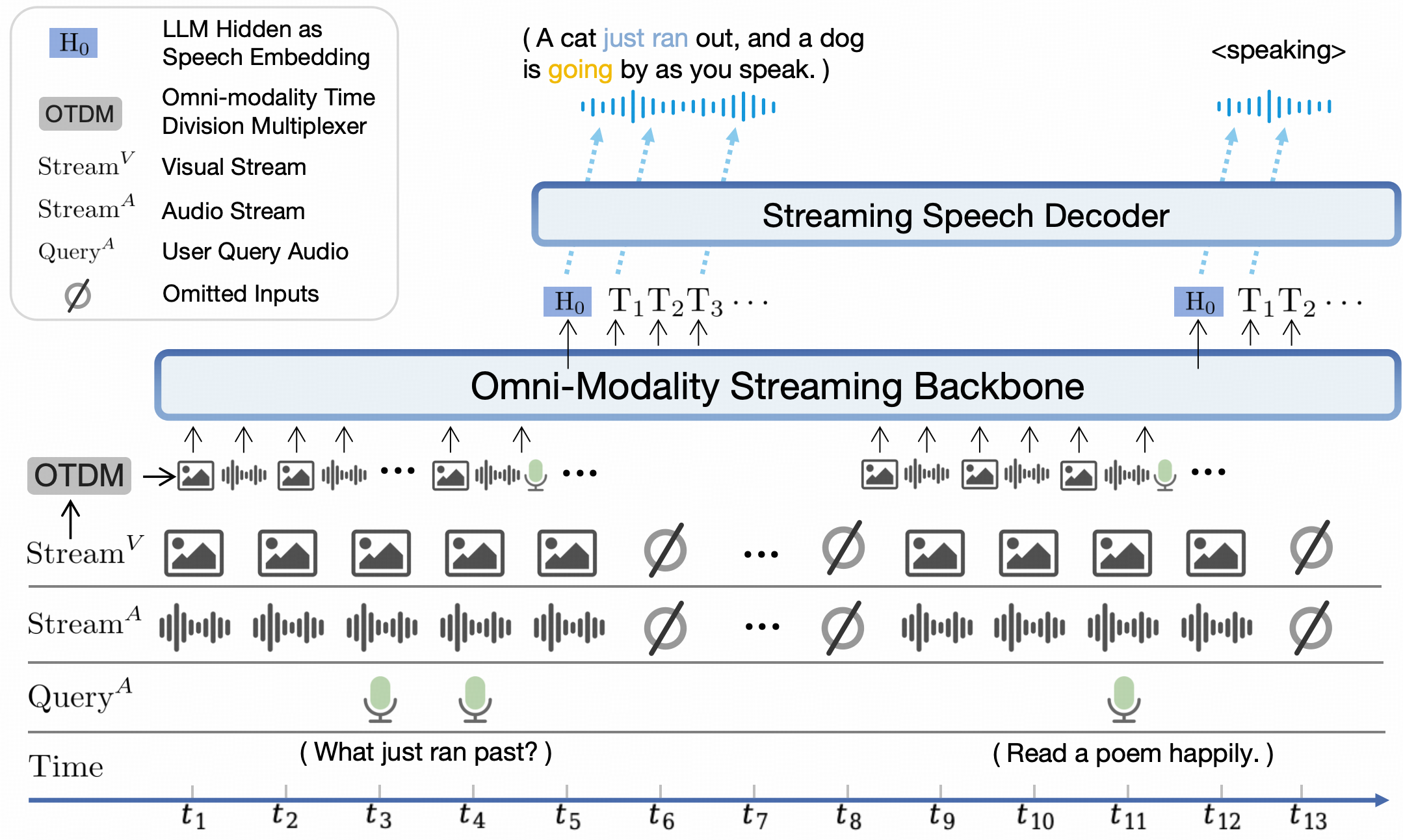
#### 多模态流式交互
点击查看 MiniCPM-o 2.6 多模态流式交互的 Python 代码。
```python
import math
import numpy as np
from PIL import Image
from moviepy.editor import VideoFileClip
import tempfile
import librosa
import soundfile as sf
import torch
from transformers import AutoModel, AutoTokenizer
def get_video_chunk_content(video_path, flatten=True):
video = VideoFileClip(video_path)
print('video_duration:', video.duration)
with tempfile.NamedTemporaryFile(suffix=".wav", delete=True) as temp_audio_file:
temp_audio_file_path = temp_audio_file.name
video.audio.write_audiofile(temp_audio_file_path, codec="pcm_s16le", fps=16000)
audio_np, sr = librosa.load(temp_audio_file_path, sr=16000, mono=True)
num_units = math.ceil(video.duration)
# 1 frame + 1s audio chunk
contents= []
for i in range(num_units):
frame = video.get_frame(i+1)
image = Image.fromarray((frame).astype(np.uint8))
audio = audio_np[sr*i:sr*(i+1)]
if flatten:
contents.extend(["", image, audio])
else:
contents.append(["", image, audio])
return contents
model = AutoModel.from_pretrained('openbmb/MiniCPM-o-2_6', trust_remote_code=True,
attn_implementation='sdpa', torch_dtype=torch.bfloat16)
model = model.eval().cuda()
tokenizer = AutoTokenizer.from_pretrained('openbmb/MiniCPM-o-2_6', trust_remote_code=True)
model.init_tts()
# If you are using an older version of PyTorch, you might encounter this issue "weight_norm_fwd_first_dim_kernel" not implemented for 'BFloat16', Please convert the TTS to float32 type.
# model.tts.float()
# https://huggingface.co/openbmb/MiniCPM-o-2_6/blob/main/assets/Skiing.mp4
video_path="assets/Skiing.mp4"
sys_msg = model.get_sys_prompt(mode='omni', language='en')
# if use voice clone prompt, please set ref_audio
# ref_audio_path = '/path/to/ref_audio'
# ref_audio, _ = librosa.load(ref_audio_path, sr=16000, mono=True)
# sys_msg = model.get_sys_prompt(ref_audio=ref_audio, mode='omni', language='en')
contents = get_video_chunk_content(video_path)
msg = {"role":"user", "content": contents}
msgs = [sys_msg, msg]
# please set generate_audio=True and output_audio_path to save the tts result
generate_audio = True
output_audio_path = 'output.wav'
res = model.chat(
msgs=msgs,
tokenizer=tokenizer,
sampling=True,
temperature=0.5,
max_new_tokens=4096,
omni_input=True, # please set omni_input=True when omni inference
use_tts_template=True,
generate_audio=generate_audio,
output_audio_path=output_audio_path,
max_slice_nums=1,
use_image_id=False,
return_dict=True
)
print(res)
```
点击查看多模态流式推理设置。
注意:流式推理存在轻微的性能下降,因为音频编码并非全局的。
```python
# a new conversation need reset session first, it will reset the kv-cache
model.reset_session()
contents = get_video_chunk_content(video_path, flatten=False)
session_id = '123'
generate_audio = True
# 1. prefill system prompt
res = model.streaming_prefill(
session_id=session_id,
msgs=[sys_msg],
tokenizer=tokenizer
)
# 2. prefill video/audio chunks
for content in contents:
msgs = [{"role":"user", "content": content}]
res = model.streaming_prefill(
session_id=session_id,
msgs=msgs,
tokenizer=tokenizer
)
# 3. generate
res = model.streaming_generate(
session_id=session_id,
tokenizer=tokenizer,
temperature=0.5,
generate_audio=generate_audio
)
audios = []
text = ""
if generate_audio:
for r in res:
audio_wav = r.audio_wav
sampling_rate = r.sampling_rate
txt = r.text
audios.append(audio_wav)
text += txt
res = np.concatenate(audios)
sf.write("output.wav", res, samplerate=sampling_rate)
print("text:", text)
print("audio saved to output.wav")
else:
for r in res:
text += r['text']
print("text:", text)
```
### 多卡推理
您可以通过将模型的层分布在多个低显存显卡(12 GB 或 16 GB)上,运行 MiniCPM-Llama3-V 2.5。请查看该[教程](https://github.com/OpenBMB/MiniCPM-V/blob/main/docs/inference_on_multiple_gpus.md),详细了解如何使用多张低显存显卡载入模型并进行推理。
### Mac 推理
点击查看 MiniCPM-Llama3-V 2.5 / MiniCPM-V 2.0 基于Mac MPS运行 (Apple silicon 或 AMD GPUs)的示例。
```python
# test.py Need more than 16GB memory to run.
import torch
from PIL import Image
from transformers import AutoModel, AutoTokenizer
model = AutoModel.from_pretrained('openbmb/MiniCPM-Llama3-V-2_5', trust_remote_code=True, low_cpu_mem_usage=True)
model = model.to(device='mps')
tokenizer = AutoTokenizer.from_pretrained('openbmb/MiniCPM-Llama3-V-2_5', trust_remote_code=True)
model.eval()
image = Image.open('./assets/hk_OCR.jpg').convert('RGB')
question = 'Where is this photo taken?'
msgs = [{'role': 'user', 'content': question}]
answer, context, _ = model.chat(
image=image,
msgs=msgs,
context=None,
tokenizer=tokenizer,
sampling=True
)
print(answer)
```
运行:
```shell
PYTORCH_ENABLE_MPS_FALLBACK=1 python test.py
```
### 基于 llama.cpp、Ollama、vLLM 的高效推理
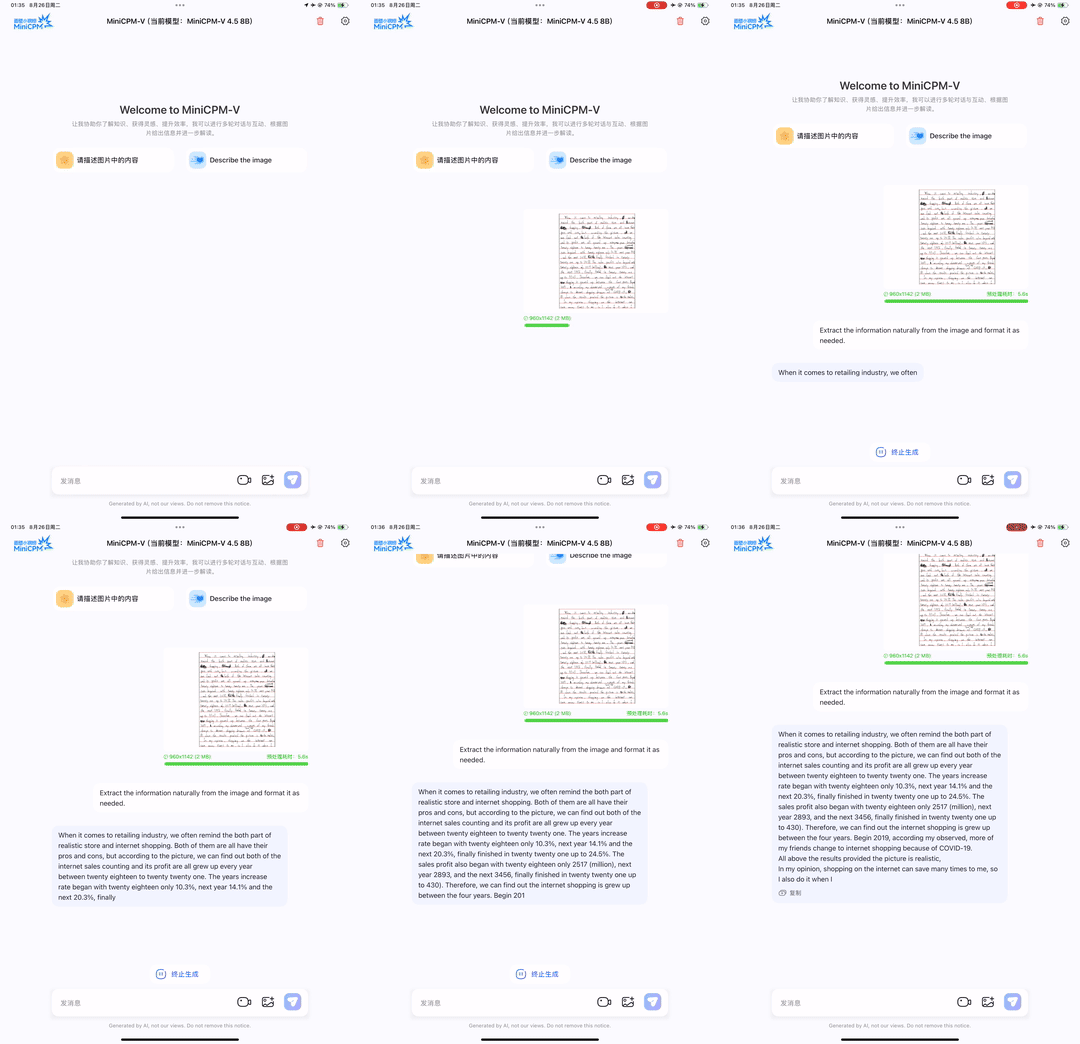
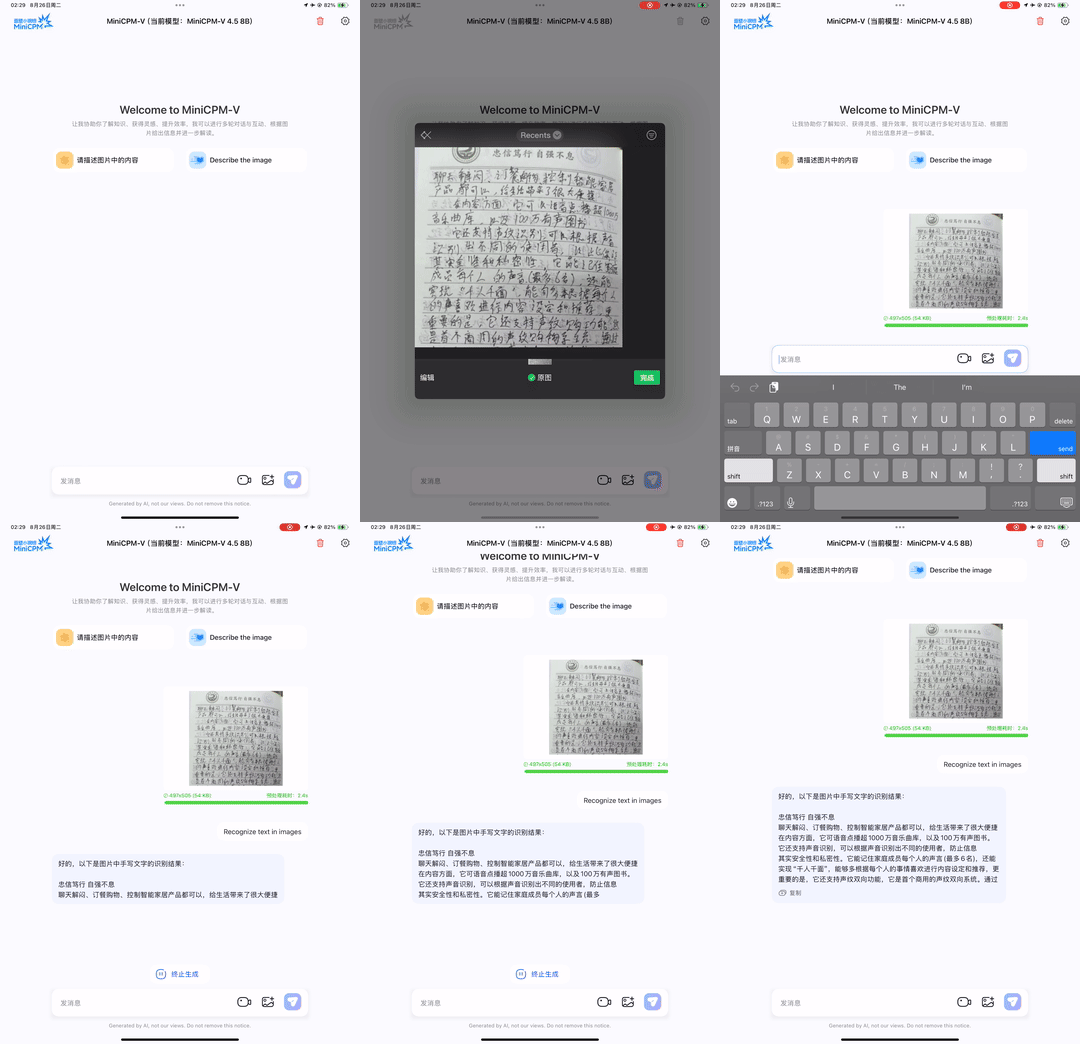
llama.cpp 用法请参考[我们的fork llama.cpp](https://github.com/OpenBMB/llama.cpp/tree/minicpmv-main/examples/llava/README-minicpmv2.6.md), 在iPad上可以支持 16~18 token/s 的流畅推理(测试环境:iPad Pro + M4)。
Ollama 用法请参考[我们的fork Ollama](https://github.com/OpenBMB/ollama/blob/minicpm-v2.6/examples/minicpm-v2.6/README.md), 在iPad上可以支持 16~18 token/s 的流畅推理(测试环境:iPad Pro + M4)。
点击查看, vLLM 现已官方支持MiniCPM-o 2.6、MiniCPM-V 2.6、MiniCPM-Llama3-V 2.5 和 MiniCPM-V 2.0。
1. 安装 vLLM(>=0.7.1):
```shell
pip install vllm
```
2. 运行示例代码:(注意:如果使用本地路径的模型,请确保模型代码已更新到Hugging Face上的最新版)
* [图文示例](https://docs.vllm.ai/en/latest/getting_started/examples/vision_language.html)
* [音频示例](https://docs.vllm.ai/en/latest/getting_started/examples/audio_language.html)
## 微调
### 简易微调
我们支持使用 Huggingface Transformers 库简易地微调 MiniCPM-V 4.0、MiniCPM-o 2.6、MiniCPM-V 2.6、MiniCPM-Llama3-V 2.5 和 MiniCPM-V 2.0 模型。
[参考文档](./finetune/readme.md)
### 使用 Align-Anything
我们支持使用北大团队开发的 [Align-Anything](https://github.com/PKU-Alignment/align-anything) 框架微调 MiniCPM-o 系列模型,同时支持 DPO 和 SFT 在视觉和音频模态上的微调。Align-Anything 是一个用于对齐全模态大模型的高度可扩展框架,开源了[数据集、模型和评测](https://huggingface.co/datasets/PKU-Alignment/align-anything)。它支持了 30+ 开源基准,40+ 模型,以及包含SFT、SimPO、RLHF在内的多种算法,并提供了 30+ 直接可运行的脚本,适合初学者快速上手。
最佳实践: [MiniCPM-o 2.6](https://github.com/PKU-Alignment/align-anything/tree/main/scripts).
### 使用 LLaMA-Factory
我们支持使用 LLaMA-Factory 微调 MiniCPM-o 2.6 和 MiniCPM-V 2.6。LLaMA-Factory 提供了一种灵活定制 200 多个大型语言模型(LLM)微调(Lora/Full/Qlora)解决方案,无需编写代码,通过内置的 Web 用户界面 LLaMABoard 即可实现训练/推理/评估。它支持多种训练方法,如 sft/ppo/dpo/kto,并且还支持如 Galore/BAdam/LLaMA-Pro/Pissa/LongLoRA 等高级算法。
最佳实践: [MiniCPM-V 4.0 | MiniCPM-o 2.6 | MiniCPM-V 2.6](./docs/llamafactory_train_and_infer.md).
### 使用 SWIFT 框架
我们支持使用 SWIFT 框架微调 MiniCPM-V 系列模型。SWIFT 支持近 200 种大语言模型和多模态大模型的训练、推理、评测和部署。支持 PEFT 提供的轻量训练方案和完整的 Adapters 库支持的最新训练技术如 NEFTune、LoRA+、LLaMA-PRO 等。
参考文档:[MiniCPM-V 1.0](https://github.com/modelscope/swift/blob/main/docs/source/Multi-Modal/minicpm-v最佳实践.md),[MiniCPM-V 2.0](https://github.com/modelscope/swift/blob/main/docs/source/Multi-Modal/minicpm-v-2最佳实践.md) [MiniCPM-V 2.6](https://github.com/modelscope/ms-swift/issues/1613).
## MiniCPM-V & o 使用手册
欢迎探索我们整理的[使用手册 (Cookbook)](https://github.com/OpenSQZ/MiniCPM-V-CookBook),其中提供了针对 MiniCPM-V 和 MiniCPM-o 模型系列的全面、开箱即用的解决方案。本手册赋能开发者快速构建集成了视觉、语音和直播能力的多模态 AI 应用。主要特性包括:
**易用的文档**
我们的详尽[文档网站](https://minicpm-o.readthedocs.io/en/latest/index.html)以清晰、条理分明的方式呈现每一份解决方案。
**广泛的用户支持**
我们支持从个人用户到企业和研究者的广泛用户群体。
* **个人用户**:借助[Ollama](https://github.com/OpenSQZ/MiniCPM-V-CookBook/blob/main/deployment/ollama/minicpm-v4_ollama.md)和[Llama.cpp](https://github.com/OpenSQZ/MiniCPM-V-CookBook/blob/main/deployment/llama.cpp/minicpm-v4_llamacpp.md),仅需极简设置即可轻松进行模型推理。
* **企业用户**:通过[vLLM](https://github.com/OpenSQZ/MiniCPM-V-CookBook/blob/main/deployment/vllm/minicpm-v4_vllm.md)和[SGLang](https://github.com/OpenSQZ/MiniCPM-V-CookBook/blob/main/deployment/sglang/MiniCPM-v4_sglang.md)实现高吞吐量、可扩展的高性能部署。
* **研究者**:利用包括[Transformers](https://github.com/OpenSQZ/MiniCPM-V-CookBook/blob/main/finetune/finetune_full.md)、[LLaMA-Factory](https://github.com/OpenSQZ/MiniCPM-V-CookBook/blob/main/finetune/finetune_llamafactory.md)、[SWIFT](https://github.com/OpenSQZ/MiniCPM-V-CookBook/blob/main/finetune/swift.md)和[Align-anything](https://github.com/OpenSQZ/MiniCPM-V-CookBook/blob/main/finetune/align_anything.md)在内的先进框架,进行灵活的模型开发和前沿实验。
**多样化的部署场景**
我们的生态系统为各种硬件环境和部署需求提供最优解决方案。
* **Web Demo**:使用[FastAPI](https://github.com/OpenSQZ/MiniCPM-V-CookBook/blob/main/demo/README.md)快速启动交互式多模态 AI Web 演示。
* **量化部署**:通过[GGUF](https://github.com/OpenSQZ/MiniCPM-V-CookBook/blob/main/quantization/gguf/minicpm-v4_gguf_quantize.md)和[BNB](https://github.com/OpenSQZ/MiniCPM-V-CookBook/blob/main/quantization/bnb/minicpm-v4_bnb_quantize.md)量化技术,最大化效率并最小化资源消耗。
* **边缘设备**:将强大的 AI 体验带到[iPhone 和 iPad](https://github.com/OpenSQZ/MiniCPM-V-CookBook/blob/main/demo/ios_demo/ios.md),支持离线及隐私敏感的应用场景。
## 基于 MiniCPM-V & MiniCPM-o 的更多项目
- [text-extract-api](https://github.com/CatchTheTornado/text-extract-api): 利用 OCR 和 Ollama 模型的本地化文档提取与解析API,支持PDF、Word、PPTX 
- [comfyui_LLM_party](https://github.com/heshengtao/comfyui_LLM_party): 基于 ComfyUI 的 LLM Agent 框架,用于构建并集成 LLM 工作流 
- [Ollama-OCR](https://github.com/imanoop7/Ollama-OCR): 通过 Ollama 调用视觉语言模型,从图像和 PDF 中提取文本的 OCR 工具 
- [comfyui-mixlab-nodes](https://github.com/MixLabPro/comfyui-mixlab-nodes): ComfyUI 多功能节点合集,支持工作流一键转APP、语音识别合成、3D等功能 
- [OpenAvatarChat](https://github.com/HumanAIGC-Engineering/OpenAvatarChat): 可在单台PC上完整运行的模块化、开源交互式数字人对话系统 
- [pensieve](https://github.com/arkohut/pensieve): 完全本地化、保护隐私的被动式屏幕记录工具,自动截屏并建立索引,可通过Web界面进行检索 
- [paperless-gpt](https://github.com/icereed/paperless-gpt): 利用LLM和视觉模型,为 paperless-ngx 实现AI驱动的文档自动化处理与OCR功能 
- [Neuro](https://github.com/kimjammer/Neuro): Neuro-Sama的复刻版,完全依赖消费级硬件上的本地模型运行 
## FAQs
点击查看 [FAQs](./docs/faqs.md)
## 模型局限性
我们实验发现 MiniCPM-o 2.6 存在一些显著的局限性,需要进一步研究和改进:
- **不稳定的语音输出。** 语音生成可能会受到背景噪音和无意义声音的影响,表现不稳定。
- **重复响应。** 当遇到连续相似的用户请求时,模型往往会重复相同的回答。
- **Web Demo 延迟较高。** 用户在使用远程服务器上部署的 web demo 时可能会产生较高延迟。我们推荐用户在本地部署来获得更低延迟的体验。
## 模型协议
* 本仓库中代码依照 [Apache-2.0](https://github.com/OpenBMB/MiniCPM/blob/main/LICENSE) 协议开源
* MiniCPM-o/V 模型权重的使用则需要遵循 [“MiniCPM模型商用许可协议.md”](https://github.com/OpenBMB/MiniCPM/blob/main/MiniCPM%E6%A8%A1%E5%9E%8B%E5%95%86%E7%94%A8%E8%AE%B8%E5%8F%AF%E5%8D%8F%E8%AE%AE.md)。
* MiniCPM 模型权重对学术研究完全开放,在填写[“问卷”](https://modelbest.feishu.cn/share/base/form/shrcnpV5ZT9EJ6xYjh3Kx0J6v8g)进行登记后亦允许免费商业使用。
## 声明
作为多模态大模型,MiniCPM-o/V 系列模型(包括 OmniLMM)通过学习大量的多模态数据来生成内容,但它无法理解、表达个人观点或价值判断,它所输出的任何内容都不代表模型开发者的观点和立场。
因此用户在使用本项目的系列模型生成的内容时,应自行负责对其进行评估和验证。如果由于使用本项目的系列开源模型而导致的任何问题,包括但不限于数据安全问题、公共舆论风险,或模型被误导、滥用、传播或不当利用所带来的任何风险和问题,我们将不承担任何责任。
## 机构
本项目由以下机构共同开发:
- [清华大学自然语言处理实验室](https://nlp.csai.tsinghua.edu.cn/)
- [面壁智能](https://modelbest.cn/)
## 🌟 Star History
## 支持技术和其他多模态项目
👏 欢迎了解 MiniCPM-o/V 背后的支持技术和更多我们的多模态项目!
[VisCPM](https://github.com/OpenBMB/VisCPM/tree/main) | [RLPR](https://github.com/OpenBMB/RLPR) | [RLHF-V](https://github.com/RLHF-V/RLHF-V) | [LLaVA-UHD](https://github.com/thunlp/LLaVA-UHD) | [RLAIF-V](https://github.com/RLHF-V/RLAIF-V)
## 引用
如果您觉得我们模型/代码/论文有帮助,请给我们 ⭐ 和 引用 📝,感谢!
```bib
@article{yao2024minicpm,
title={MiniCPM-V: A GPT-4V Level MLLM on Your Phone},
author={Yao, Yuan and Yu, Tianyu and Zhang, Ao and Wang, Chongyi and Cui, Junbo and Zhu, Hongji and Cai, Tianchi and Li, Haoyu and Zhao, Weilin and He, Zhihui and others},
journal={arXiv preprint arXiv:2408.01800},
year={2024}
}
```
 **端侧可用的 GPT-4o 级视觉、语音、多模态实时流式大模型**
中文 |
[English](./README.md)
微信社区 |
🍳 使用指南
**端侧可用的 GPT-4o 级视觉、语音、多模态实时流式大模型**
中文 |
[English](./README.md)
微信社区 |
🍳 使用指南
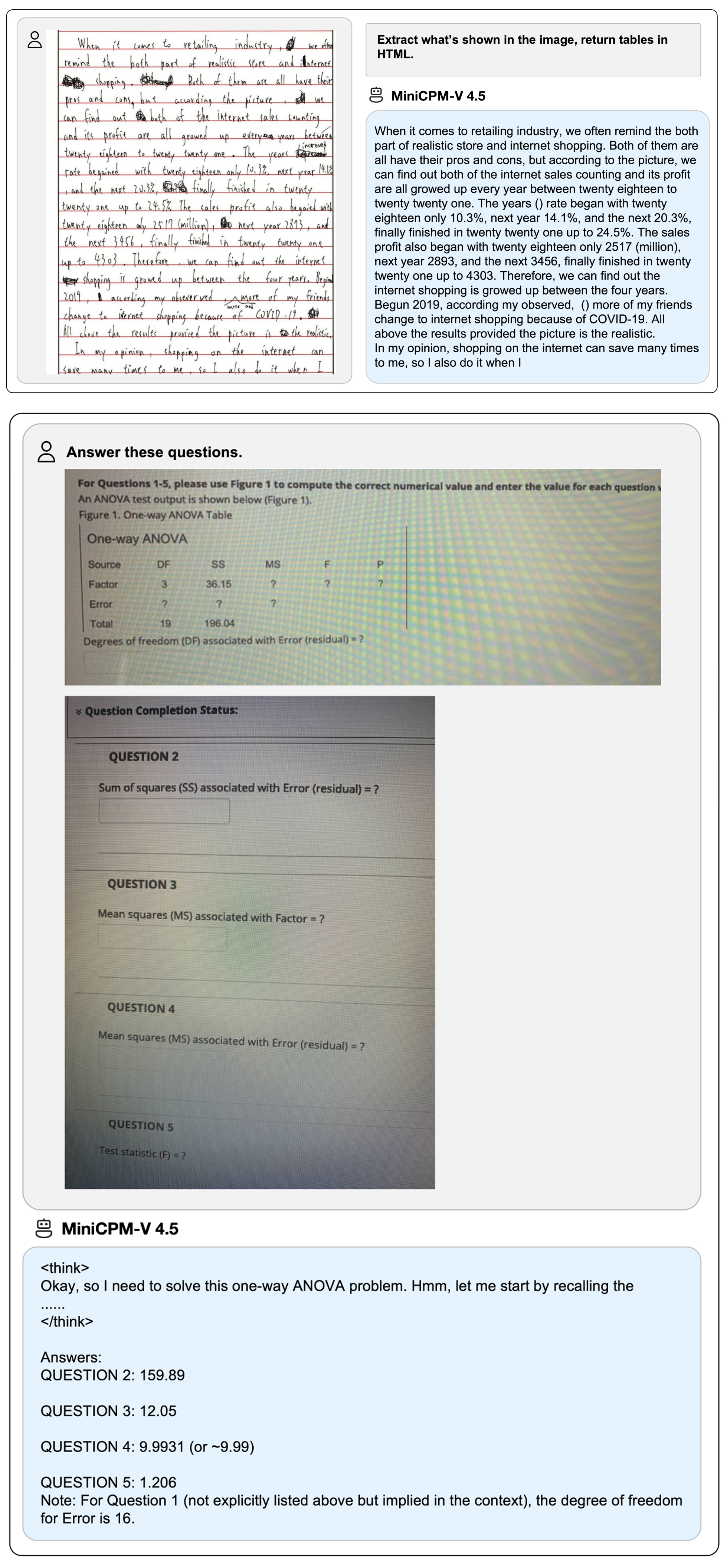
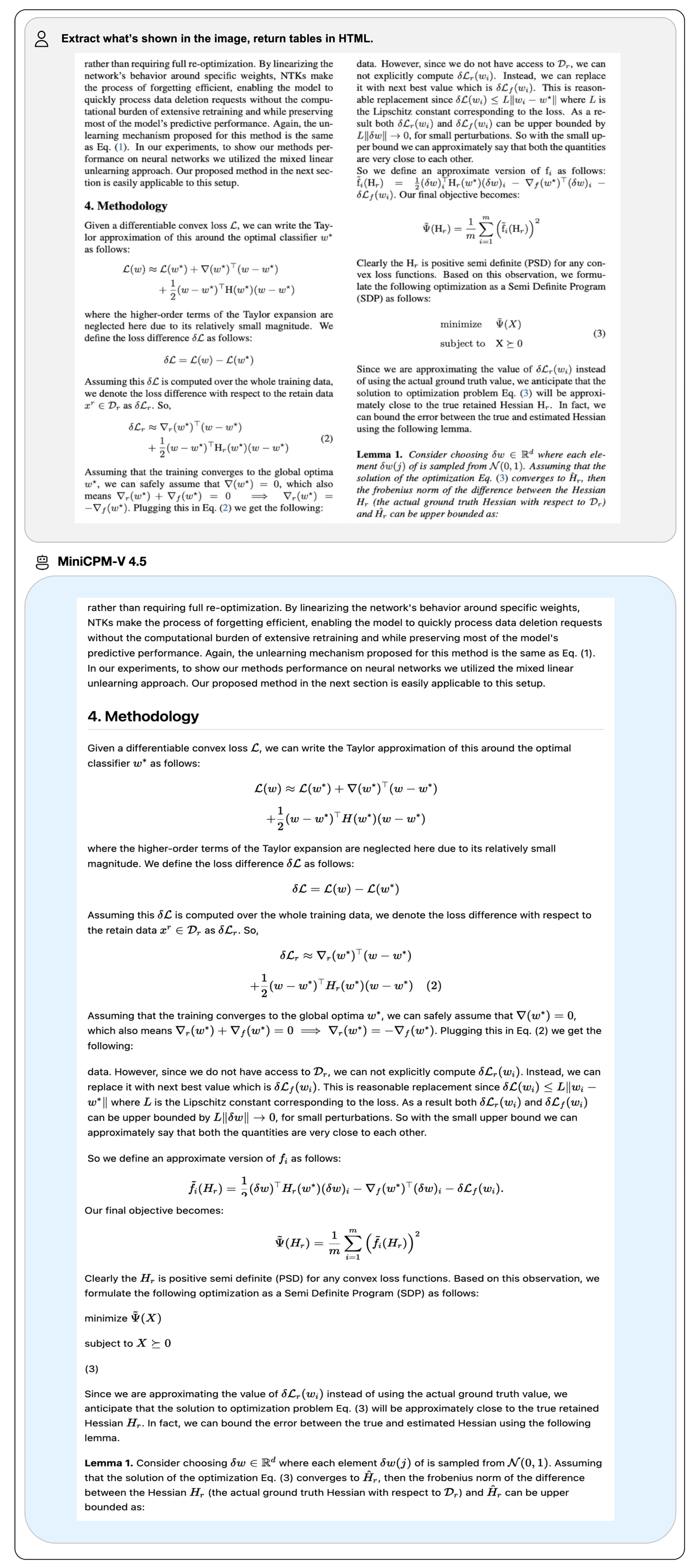


 支持的在线和本地 Demo。Gradio 是目前最流行的模型部署框架,支持流式输出、进度条、process bars 和其他常用功能。
### Online Demo
欢迎试用 Online Demo: [MiniCPM-V 2.6](http://120.92.209.146:8887/) | [MiniCPM-Llama3-V 2.5](https://huggingface.co/spaces/openbmb/MiniCPM-Llama3-V-2_5) | [MiniCPM-V 2.0](https://huggingface.co/spaces/openbmb/MiniCPM-V-2) 。
### 本地 WebUI Demo
您可以使用以下命令轻松构建自己的本地 WebUI Demo。更详细的部署教程请参考[文档](https://modelbest.feishu.cn/wiki/RnjjwnUT7idMSdklQcacd2ktnyN)。
**实时流式视频/语音通话demo:**
1. 启动model server:
```shell
pip install -r requirements_o2.6.txt
python web_demos/minicpm-o_2.6/model_server.py
```
请确保 `transformers==4.44.2`,其他版本目前可能会有兼容性问题,我们正在解决。
如果你使用的低版本的 Pytorch,你可能会遇到这个错误`"weight_norm_fwd_first_dim_kernel" not implemented for 'BFloat16'`, 请在模型初始化的时候添加 `self.minicpmo_model.tts.float()`
2. 启动web server:
```shell
# Make sure Node and PNPM is installed.
sudo apt-get update
sudo apt-get install nodejs npm
npm install -g pnpm
cd web_demos/minicpm-o_2.6/web_server
# 为https创建自签名证书, 要申请浏览器摄像头和麦克风权限须启动https.
bash ./make_ssl_cert.sh # output key.pem and cert.pem
pnpm install # install requirements
pnpm run dev # start server
```
浏览器打开`https://localhost:8088/`,开始体验实时流式视频/语音通话.
**Chatbot图文对话demo:**
```shell
pip install -r requirements_o2.6.txt
python web_demos/minicpm-o_2.6/chatbot_web_demo_o2.6.py
```
浏览器打开`http://localhost:8000/`,开始体验图文对话Chatbot.
## 推理
### 模型库
| 模型 | 设备 | 资源 | 简介 | 下载链接 |
|:--------------|:-:|:----------:|:-------------------|:---------------:|
| MiniCPM-V 4.5| GPU | 18 GB | 提供出色的端侧单图、多图、视频理解能力。 | [🤗](https://huggingface.co/openbmb/MiniCPM-V-4_5) [
支持的在线和本地 Demo。Gradio 是目前最流行的模型部署框架,支持流式输出、进度条、process bars 和其他常用功能。
### Online Demo
欢迎试用 Online Demo: [MiniCPM-V 2.6](http://120.92.209.146:8887/) | [MiniCPM-Llama3-V 2.5](https://huggingface.co/spaces/openbmb/MiniCPM-Llama3-V-2_5) | [MiniCPM-V 2.0](https://huggingface.co/spaces/openbmb/MiniCPM-V-2) 。
### 本地 WebUI Demo
您可以使用以下命令轻松构建自己的本地 WebUI Demo。更详细的部署教程请参考[文档](https://modelbest.feishu.cn/wiki/RnjjwnUT7idMSdklQcacd2ktnyN)。
**实时流式视频/语音通话demo:**
1. 启动model server:
```shell
pip install -r requirements_o2.6.txt
python web_demos/minicpm-o_2.6/model_server.py
```
请确保 `transformers==4.44.2`,其他版本目前可能会有兼容性问题,我们正在解决。
如果你使用的低版本的 Pytorch,你可能会遇到这个错误`"weight_norm_fwd_first_dim_kernel" not implemented for 'BFloat16'`, 请在模型初始化的时候添加 `self.minicpmo_model.tts.float()`
2. 启动web server:
```shell
# Make sure Node and PNPM is installed.
sudo apt-get update
sudo apt-get install nodejs npm
npm install -g pnpm
cd web_demos/minicpm-o_2.6/web_server
# 为https创建自签名证书, 要申请浏览器摄像头和麦克风权限须启动https.
bash ./make_ssl_cert.sh # output key.pem and cert.pem
pnpm install # install requirements
pnpm run dev # start server
```
浏览器打开`https://localhost:8088/`,开始体验实时流式视频/语音通话.
**Chatbot图文对话demo:**
```shell
pip install -r requirements_o2.6.txt
python web_demos/minicpm-o_2.6/chatbot_web_demo_o2.6.py
```
浏览器打开`http://localhost:8000/`,开始体验图文对话Chatbot.
## 推理
### 模型库
| 模型 | 设备 | 资源 | 简介 | 下载链接 |
|:--------------|:-:|:----------:|:-------------------|:---------------:|
| MiniCPM-V 4.5| GPU | 18 GB | 提供出色的端侧单图、多图、视频理解能力。 | [🤗](https://huggingface.co/openbmb/MiniCPM-V-4_5) [ ](https://modelscope.cn/models/OpenBMB/MiniCPM-V-4_5) |
| MiniCPM-V 4.5 gguf | CPU | 8 GB | gguf 版本,更低的内存占用和更高的推理效率。 | [🤗](https://huggingface.co/openbmb/MiniCPM-V-4_5-gguf) [
](https://modelscope.cn/models/OpenBMB/MiniCPM-V-4_5) |
| MiniCPM-V 4.5 gguf | CPU | 8 GB | gguf 版本,更低的内存占用和更高的推理效率。 | [🤗](https://huggingface.co/openbmb/MiniCPM-V-4_5-gguf) [
 [清华大学自然语言处理实验室](https://nlp.csai.tsinghua.edu.cn/)
-
[清华大学自然语言处理实验室](https://nlp.csai.tsinghua.edu.cn/)
-  [面壁智能](https://modelbest.cn/)
## 🌟 Star History
[面壁智能](https://modelbest.cn/)
## 🌟 Star History